Trusted Reports Logo

TrustedReports

HomeOffice

Best Digital Calendars for Families in 2026

Bring calendars, chores, and meal plans together on one easy-to-see family screen. Find the features that make a shared household hub genuinely useful—without paying for extras you won’t use.

Updated September 2026Independently researchedTop 8 picks

A family calendar works best when everyone can check it quickly and keep it current. Focus first on a screen that’s easy to read in your home, dependable syncing with the calendars you already use, and useful household tools that don’t come with unwanted ongoing costs.

Choose a calendar your household will actually use

Make visibility the priority. A wall calendar is most helpful when family members can read it from across a busy kitchen or entryway. A larger display can show more of the schedule at once, while a smaller one may suit a desk or countertop better. Measure the intended spot and consider viewing distance before choosing.

Check your calendar services before anything else. Confirm that the device syncs with the accounts your household already relies on, and look for clear details about adding multiple people or calendars. Color-coding can make a crowded week easier to scan, but compatible services and a straightforward setup matter more than a long feature list.

Keep recurring costs in view. Some calendars advertise their core planning tools without a subscription, while others make certain extras part of an optional paid plan. Read the plan details carefully: find out whether the features you want—such as photo displays, importing events, or reward systems—are included in the initial purchase.

Use chores and meals to reduce daily back-and-forth. A shared chore chart can make responsibilities visible, and rewards may help keep children engaged. Meal planning is useful when it puts the week’s menu somewhere everyone can check; grocery lists and reminders can make that setup more practical still.

What to look for

Screen size affects how much the family can see at once. Listings usually give the diagonal measurement in inches, not the screen’s width. For a central wall display viewed from a few steps away, favor a larger screen; for a nearby desk or a tighter space, a compact one may be sufficient. Check the product dimensions and mounting arrangement as well as the diagonal.

Subscription details determine the long-term cost. “No subscription” is most useful when it applies to the everyday features you plan to use, not just basic calendar viewing. A good value keeps core scheduling available without recurring fees; if a paid tier is optional, make sure its extras are worth the added cost to your family.

Calendar sync should cover your household’s existing accounts. Google, iCloud, and Outlook are common services to check, but families may also depend on other platforms. A good match names the services you actually use and explains how events are shared and updated. Don’t assume that a vague promise of “calendar sync” includes every provider.

A chore chart is worthwhile when it fits your routine. Look for the ability to assign tasks clearly, and consider whether reminders, repeat schedules, or rewards matter to your family. A useful chart should make responsibilities easier to follow rather than add another complicated system to manage.

Meal planning is a helpful extra, not a requirement. Choose a calendar with it if you want the week’s meals visible alongside everyone’s commitments. A good fit makes menus easy to review and, if you need it, supports related shopping lists; otherwise, a simple shared calendar may be enough.

Photo display can give the screen a second job. A photo-frame or slideshow feature is useful if you want the calendar to show family pictures when nobody is checking the schedule. Check how photos are added and whether storage or particular sharing features have limits or require a paid plan.

Plan the setup before it arrives

Pick a spot that invites a quick glance. Kitchens and entryways are natural places for a family hub, but nearby outlets, glare, and comfortable touch-screen access matter too. Confirm whether the unit can be wall-mounted, placed on a stand, or both, and check that the included mounting hardware suits your space.

Set up shared access deliberately. Decide which family members should be able to add or edit events, and agree on a simple color or naming system. Before relying on the display, add a test event and check that it appears where expected. This is an easy way to catch account-permission or sync issues early.

Treat app and assistant features as bonuses. Some calendars offer customizable dashboards, extra apps, voice controls, or smart-home integrations. These can be convenient, but check which functions are included, which devices or accounts they require, and whether you can keep the display focused on the schedule.

Before you buy

Match the feature list to your real routine. Start with screen visibility, calendar compatibility, and subscription terms; then decide whether chores, meal planning, and photo display will get regular use. Review the current listing for exact dimensions, included accessories, warranty terms, and any feature limits, since these can vary.

Frequently Asked Questions

Swipe to compare all 8 picks →

At a glance
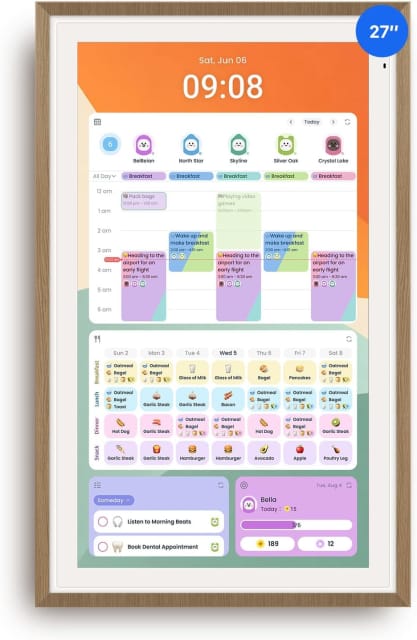
1Apolosign 27-inch Digital Calendar, No-Subscription, Smart Wall Planner with Calendar Sync, Chore Chart, Meal, Apps & Dashboard, Electronic Touchscreen Display for Family Schedules, Dual Mode (Teak)
ApoloSign 27-Inch Digital Calendar
2BSIMB 10.1" No Subscription Family Digital Calendar & Chore Chart
Bsimb 10.1-Inch Family Digital Calendar
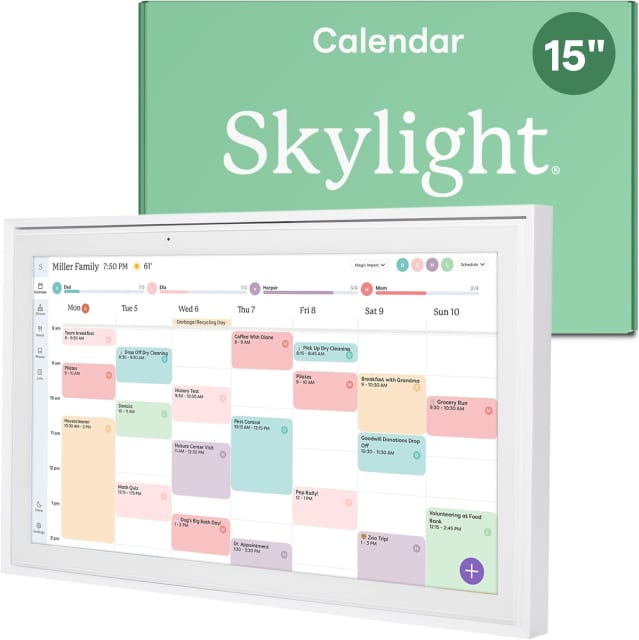
3Skylight Calendar – 15" Touchscreen Digital Calendar & Chore Chart, White
Skylight 15-Inch Digital Calendar & Chore Chart
4Digital Calendar 15.6" Smart Calendar&Chore Chart, 1080P Interactive Touchscreen Electronic Calendar for Family Schedules, 64GB Digital Picture Frame WiFi, Wall Mountable, AiMOR APP-White
Linkdaze 15.6-Inch Smart Family Calendar
5LOOFII 15.6 Inch Smart Digital Calendar – 1920×1080 Full HD Touchscreen Calendar & Family Planner with Chore Chart & Meal Planner, Wall-Mountable (Black White)
LOOFII 15.6-Inch Smart Digital Calendar
6Westsee 15.6" Digital Calendar, No Subscription Smart Family Planner
Westsee 15.6-Inch Digital Calendar
7Dragon Touch 10.1 inch Digital Calendar Chore Chart – Interactive Touchscreen, Smart Family Planner, Hearth Display Desk Digital Calendar Best Gifts for Christmas, Wedding, Mom
Dragon Touch 10.1-Inch Digital Calendar
8Digital Calendar Wall Planner 10.1 Inch Touch Screen WiFi picture frame
Annalivkg 10.1-Inch Digital Calendar
Our score9.9/109.6/109.3/109.0/108.7/108.4/108.1/107.8/10
Buyer rating
4.5
4.4
4.4
4.4
4.5
4.5
4.6
4.5
Screen Size27 in10.1 in15.4 in15.6 in15.6 in15.6 in10.1 in10.1 in
Core SubscriptionNo subscription statedNo subscription statedOptional or feature-specificOptional or feature-specificOptional or feature-specificOptional or feature-specificOptional or feature-specificNo subscription stated
Calendar SyncGoogle/iCloud/Outlook namediCloud, Outlook, Cozi, Yahoo CalendarAdditional platforms namedGoogle/iCloud/Outlook namedGoogle/iCloud/Outlook namedGoogle/iCloud/Outlook namedGoogle/iCloud/Outlook named: Google and iOSGoogle, Apple, Yahoo, Outlook, and Cozi
Chore ChartYesYesYesYesYesYesYesYes
Meal PlannerYesYesYesYesYesYesYesYes
Photo DisplayYesYesYesYesYesYesYesYes
Buy
Apolosign 27-inch Digital Calendar, No-Subscription, Smart Wall Planner with Calendar Sync, Chore Chart, Meal, Apps & Dashboard, Electronic Touchscreen Display for Family Schedules, Dual Mode (Teak)

ApoloSign 27-Inch Digital Calendar

Our score
9.9/10
Buyer rating
4.5
Price
$$$

This wall-mounted touchscreen planner combines shared calendar viewing with a family dashboard. It syncs calendars including Google Calendar, iCloud, and Outlook, and offers separate calendar and Android modes. Built-in planning tools cover chores, routines, shopping lists, and meal planning; the listing also describes app and widget support, photo slideshows, and voice-assistant features. Reviewers praise calendar syncing and family organization, though one reports confusing Google Calendar setup instructions and another describes a mounting fit issue.

  • Syncs calendars from Google, iCloud, Outlook, and more
  • Includes chore tracking with customizable rewards
  • Switches between calendar and Android modes
  • Supports photo slideshows and dashboard widgets

available at Amazon

A feature-rich shared family planner with useful chore tools, but setup and mounting may take more effort than expected.
Our take

Buy it if

You want a prominent household hub for shared calendars, chores, and lists, and value having Android mode and dashboard features in one display.

Skip it if

You expect completely effortless calendar syncing or need a compact, straightforward planner; a reviewer reports confusing setup guidance, and another had trouble fitting the mount around the power cable.

How it scores

Performance
8.0
Ease of use
6.0
Value
6.0
Build quality
8.0

What buyers say

  • Calendar syncing and shared schedule visibility

    33% of reviews
  • Family organization and engaging chore features

    33% of reviews
  • Calendar setup guidance can be confusing

    11% of reviews
  • Mounting fit can be tricky around the power cable

    11% of reviews
Screen Size
27 in
Core Subscription
No subscription stated
Calendar Sync
Google/iCloud/Outlook named
Chore Chart
Yes
Meal Planner
Yes
Photo Display
Yes

ApoloSign 27-Inch Digital Calendar

4.5

available at Amazon

BSIMB 10.1" No Subscription Family Digital Calendar & Chore Chart

Bsimb 10.1-Inch Family Digital Calendar

Our score
9.6/10
Buyer rating
4.4
Price
$$$

This 10.1-inch touchscreen calendar brings shared family schedules, chores, reminders, and lists into one place, with color-coded views for different family members. It syncs over Wi-Fi with iCloud, Outlook, Cozi, and Yahoo Calendar, and includes task tracking with rewards, meal planning, and photo sharing. The screen adjusts brightness automatically and can sit on a countertop or be wall-mounted. Core features are listed as subscription-free, though some reviewers report app and software frustrations.

  • Color-coded schedules for family members
  • Chores, reminders, and reward tracking
  • Syncs with select online calendars
  • Countertop or wall-mounted placement

available at Amazon

A feature-packed shared family planner with useful chore tools, but the app and reliability concerns make it a cautious pick.
Our take

Buy it if

You want a shared, always-visible hub for family schedules and chores, with calendar syncing and no subscription for core features.

Skip it if

You need consistently smooth companion-app performance or are wary of reports about glitches and devices stopping work.

How it scores

Performance
7.0
Ease of use
7.0
Value
8.0
Build quality
6.0

What buyers say

  • Easy setup and everyday use

    45% of reviews
  • Useful, well-liked family gift

    36% of reviews
  • App and software need improvement

    27% of reviews
  • Glitches or stopped working

    18% of reviews
Screen Size
10.1 in
Core Subscription
No subscription stated
Calendar Sync
iCloud, Outlook, Cozi, Yahoo Calendar
Chore Chart
Yes
Meal Planner
Yes
Photo Display
Yes

Bsimb 10.1-Inch Family Digital Calendar

4.4

available at Amazon

Skylight Calendar – 15" Touchscreen Digital Calendar & Chore Chart, White

Skylight 15-Inch Digital Calendar & Chore Chart

Our score
9.3/10
Buyer rating
4.4
Price
$$$

Designed as a household planning hub, this 15-inch touchscreen brings a shared digital calendar and family organization tools into a common space. It syncs over Wi-Fi with Google, iCloud, Outlook, Cozi, and Yahoo, and updates can be made on the display or through the companion app. The listing also describes color-coded events, weekly meal planning, and optional subscription features for added personalization.

  • Interactive chore chart for family routines
  • Wall mounting or countertop placement
  • Shared tasks and lists for household organization
  • Optional Disney-themed display mode

available at Amazon

A connected family planner that combines shared schedules with chores and meal planning on a large touchscreen.
Our take

Buy it if

You want household schedules, chores, and meal plans visible in one shared spot, with updates available from the screen or app.

Skip it if

You prefer a simple paper planner or want all listed personalization features without an optional subscription.

How it scores

Performance
8.0
Ease of use
8.0
Value
6.0
Build quality
7.0

What buyers say

  • Large shared touchscreen for family schedules

  • Calendar syncing across multiple services

  • Wi-Fi needed for calendar syncing

  • Some features require an optional subscription

Screen Size
15.4 in
Core Subscription
Optional or feature-specific
Calendar Sync
Additional platforms named
Chore Chart
Yes
Meal Planner
Yes
Photo Display
Yes

Skylight 15-Inch Digital Calendar & Chore Chart

4.4

available at Amazon

Digital Calendar 15.6" Smart Calendar&Chore Chart, 1080P Interactive Touchscreen Electronic Calendar for Family Schedules, 64GB Digital Picture Frame WiFi, Wall Mountable, AiMOR APP-White

Linkdaze 15.6-Inch Smart Family Calendar

Our score
9.0/10
Buyer rating
4.4
Price
$$$

This wall-mountable touchscreen brings family schedules, chore tracking, meal planning, and to-do lists together in one display. It syncs with Google, iCloud, Outlook, Cozi, and Yahoo calendars through the AiMOR app, with color-coded schedules and customizable widgets. The 1080p screen can rotate between portrait and landscape, adjust brightness automatically, and switch to photo-frame mode when idle; its 64GB storage holds photos and videos.

  • Syncs with five popular calendar services
  • Custom chore charts pair tasks with star rewards
  • Auto-rotating touchscreen supports wall or desk placement
  • Stores photos and videos for idle-time display

available at Amazon

A versatile shared family hub with useful planning tools, provided you’re comfortable managing setup and media through its companion app.
Our take

Buy it if

You want a central display for shared calendars, chores, meal planning, and family photos, with wall-mount or desktop placement.

Skip it if

You need a calendar that works without a companion app, or you regularly share large batches of photos and videos at once.

How it scores

Performance
8.0
Ease of use
7.0
Value
7.0
Build quality
7.0

What buyers say

  • Shared schedules, chore tracking, and other family planning tools

  • Large touchscreen doubles as a digital photo frame

  • Photo and video sharing is limited per transfer

  • Calendar and media features rely on the AiMOR app

Screen Size
15.6 in
Core Subscription
Optional or feature-specific
Calendar Sync
Google/iCloud/Outlook named
Chore Chart
Yes
Meal Planner
Yes
Photo Display
Yes

Linkdaze 15.6-Inch Smart Family Calendar

4.4

available at Amazon

LOOFII 15.6 Inch Smart Digital Calendar – 1920×1080 Full HD Touchscreen Calendar & Family Planner with Chore Chart & Meal Planner, Wall-Mountable (Black White)

LOOFII 15.6-Inch Smart Digital Calendar

Our score
8.7/10
Buyer rating
4.5
Price
$$$

This wall-mountable touchscreen combines a shared family calendar with chore and reward tracking and meal planning. It syncs with Google, iCloud, Outlook, and other calendars through the free eCalendar app, and can show photos as a slideshow when idle. The Full HD display and added weather, auto-brightness, auto-rotation, and sleep features make it a versatile household hub. Reviewers like its convenience, but some report clunky software and unreliable syncing.

  • Syncs calendars through the free eCalendar app
  • Tracks chores with customizable rewards
  • Plans meals across the day
  • Switches to a photo slideshow when idle

available at Amazon

A feature-packed family planning display, best for households that value a shared wall calendar and can tolerate occasional app or sync friction.
Our take

Buy it if

You want schedules, chores, and meal plans visible in one shared place, with a photo slideshow when the calendar is idle.

Skip it if

You need highly customizable planning tools or depend on consistently fast, trouble-free syncing and a polished app experience.

How it scores

Performance
7.5
Ease of use
7.0
Value
7.0
Build quality
6.5

What buyers say

  • Convenient shared schedules and straightforward use

    38% of reviews
  • Clear display and useful photo slideshow

    31% of reviews
  • Software feels limited or under-refined

    23% of reviews
  • Syncing and setup can be cumbersome

    15% of reviews
Screen Size
15.6 in
Core Subscription
Optional or feature-specific
Calendar Sync
Google/iCloud/Outlook named
Chore Chart
Yes
Meal Planner
Yes
Photo Display
Yes

LOOFII 15.6-Inch Smart Digital Calendar

4.5

available at Amazon

Westsee 15.6" Digital Calendar, No Subscription Smart Family Planner

Westsee 15.6-Inch Digital Calendar

Our score
8.4/10
Buyer rating
4.5
Price
$$$

This always-powered 15.6-inch touchscreen hub combines a shared family calendar with chore and reward tasks, meal planning, grocery lists, and photo and video display. It syncs with Google, iCloud, Outlook, and other calendars through the Zical app, with color-coded tasks, multiple calendar views, reminders, weather, and sleep mode. Built-in 32GB storage holds media, and it can sit on a tabletop or mount on a wall; it needs an outlet, and magnetic mounting isn't supported.

  • Syncs with Google, iCloud, Outlook, and more
  • Includes chore, reward, meal, and grocery planning
  • Stores photos and videos in built-in 32GB memory
  • Includes tabletop stand and wall-mount accessories

available at Amazon

A versatile family hub with useful planning and photo features, provided you have a convenient outlet and don't need magnetic mounting.
Our take

Buy it if

You want a shared touchscreen planner for schedules, chores, meal plans, and photos, with support for common calendar services and no subscription for core functions.

Skip it if

You need a battery-powered or magnet-mounted display, or expect advanced AI tools to be included without a possible subscription.

How it scores

Performance
8.0
Ease of use
7.0
Value
7.0
Build quality
6.0

What buyers say

  • Family scheduling, chores, and meal-planning features

  • Calendar syncing and photo display

  • Must remain plugged in during use

  • Does not support magnetic mounting

Screen Size
15.6 in
Core Subscription
Optional or feature-specific
Calendar Sync
Google/iCloud/Outlook named
Chore Chart
Yes
Meal Planner
Yes
Photo Display
Yes

Westsee 15.6-Inch Digital Calendar

4.5

available at Amazon

Dragon Touch 10.1 inch Digital Calendar Chore Chart – Interactive Touchscreen, Smart Family Planner, Hearth Display Desk Digital Calendar Best Gifts for Christmas, Wedding, Mom

Dragon Touch 10.1-Inch Digital Calendar

Our score
8.1/10
Buyer rating
4.6
Price
$$$

This 10.1-inch touchscreen planner brings family schedules together, with color-coded people and events and support for syncing calendars such as iOS and Google through Wi-Fi and the companion app. It also includes interactive chores, dinner planning, grocery lists, and a photo-frame mode; some features are managed from the app, and advanced Magic Import is described as paid. Reviewers report straightforward setup and useful everyday coordination, though some note a learning curve and occasional interface quirks.

  • Syncs supported calendars through Wi-Fi and the companion app
  • Color-coded schedules for family members
  • Includes interactive chores and dinner planning
  • Can display photos when used as a frame

available at Amazon

A versatile family planning screen with useful chore and meal tools, but expect some app learning and check that its power setup suits your location.
Our take

Buy it if

You want one shared screen for family events, chores, and meal plans, with calendar syncing and the option to manage items from a phone app.

Skip it if

You need a polished, especially intuitive interface or cannot use the included power plug in your region.

How it scores

Performance
8.0
Ease of use
8.0
Value
8.0
Build quality
6.0

What buyers say

  • Helps families coordinate schedules and everyday tasks

    67% of reviews
  • Setup and routine use are described as easy

    50% of reviews
  • Some app and interface quirks or learning curve

    25% of reviews
  • Some reports of power-plug mismatch or screen failure

    33% of reviews
Screen Size
10.1 in
Core Subscription
Optional or feature-specific
Calendar Sync
Google/iCloud/Outlook named: Google and iOS
Chore Chart
Yes
Meal Planner
Yes
Photo Display
Yes

Dragon Touch 10.1-Inch Digital Calendar

4.6

available at Amazon

Digital Calendar Wall Planner 10.1 Inch Touch Screen WiFi picture frame

Annalivkg 10.1-Inch Digital Calendar

Our score
7.8/10
Buyer rating
4.5
Price
$$$

This Wi-Fi touchscreen combines a family calendar with task and chore tracking, reminders, recipe saving, editable checklists, and photo display. It can sync calendars from Google, Apple, Yahoo, Outlook, and Cozi, and supports color-coded household schedules and rewards. The listing says it works in horizontal or vertical placement and uses the Wanmine app for setup. It also advertises use without subscription fees.

  • Syncs calendars from five listed platforms
  • Tracks chores with color coding and rewards
  • Stores recipes and editable checklists
  • Displays remotely shared family photos

available at Amazon

A feature-packed family organizer that pairs shared schedules with chores, meal planning, and photo display.
Our take

Buy it if

You want one shared screen for family calendars, household tasks, meal planning, and photos, with calendar syncing across supported platforms.

Skip it if

You prefer a paper-only planner or need detailed display and hardware specifications before choosing a device.

How it scores

Performance
8.0
Ease of use
7.0
Value
8.0
Build quality
6.0

What buyers say

  • Combines family scheduling with household organization

  • Supports calendar syncing and photo sharing

  • Sync setup uses the Wanmine app and Wi-Fi

  • Listing gives few detailed display and hardware specifications

Screen Size
10.1 in
Core Subscription
No subscription stated
Calendar Sync
Google, Apple, Yahoo, Outlook, and Cozi
Chore Chart
Yes
Meal Planner
Yes
Photo Display
Yes

Annalivkg 10.1-Inch Digital Calendar

4.5

available at Amazon